 Momentum
The Weekly Review
A system you don't review is a system you stop trusting. The Weekly Review wizard makes the habit nearly automatic: it walks you through every decision that keeps your system truthful, one screen at a time.
Why it exists
Task systems don't fail loudly. They fail by drift: a project stalls and nobody notices, Anytime fills with things you'll never do, and one day you realize you're keeping the real list in your head again. The review is the maintenance pass that prevents the drift — and because unstructured "go review your projects" advice never survives contact with a Sunday evening, Momentum makes it a wizard with a beginning, an end, and a decision at every step.
What the wizard walks you through
The order is the classic weekly-review checklist: get clear, get current, get creative. Stages with nothing in them don't appear, so a quiet week is a short review. A rail under the header shows where you are.
1. Get clear
The review won't start with an unprocessed inbox — a review of a system with a full inbox reviews the wrong list. If there's anything in it, one button opens Triage and brings you back here when it's empty. Then Empty your head: one field, type each thing you're carrying that isn't in the system yet, Return, repeat. Everything goes to the inbox.
2. The calendar
With calendar access on, the wizard shows last week's events one at a time — anything to capture from this? — then the coming week — anything to prepare for this? Follow-ups from meetings and prep for what's coming are the two things a task list never reminds you about. Momentum's own time blocks are never shown (they're already tasks), a repeating series shows once with its hours ("Work · 5 events · 32 h"), and the calendars to walk are your choice on the first screen.
3. Waiting for
Everything you've handed off, overdue follow-ups first. Received completes it. Chase makes a follow-up task for today, in the same project, naming who and what. Still waiting moves the follow-up date a week. Or drop it.
4. Every active project, one at a time
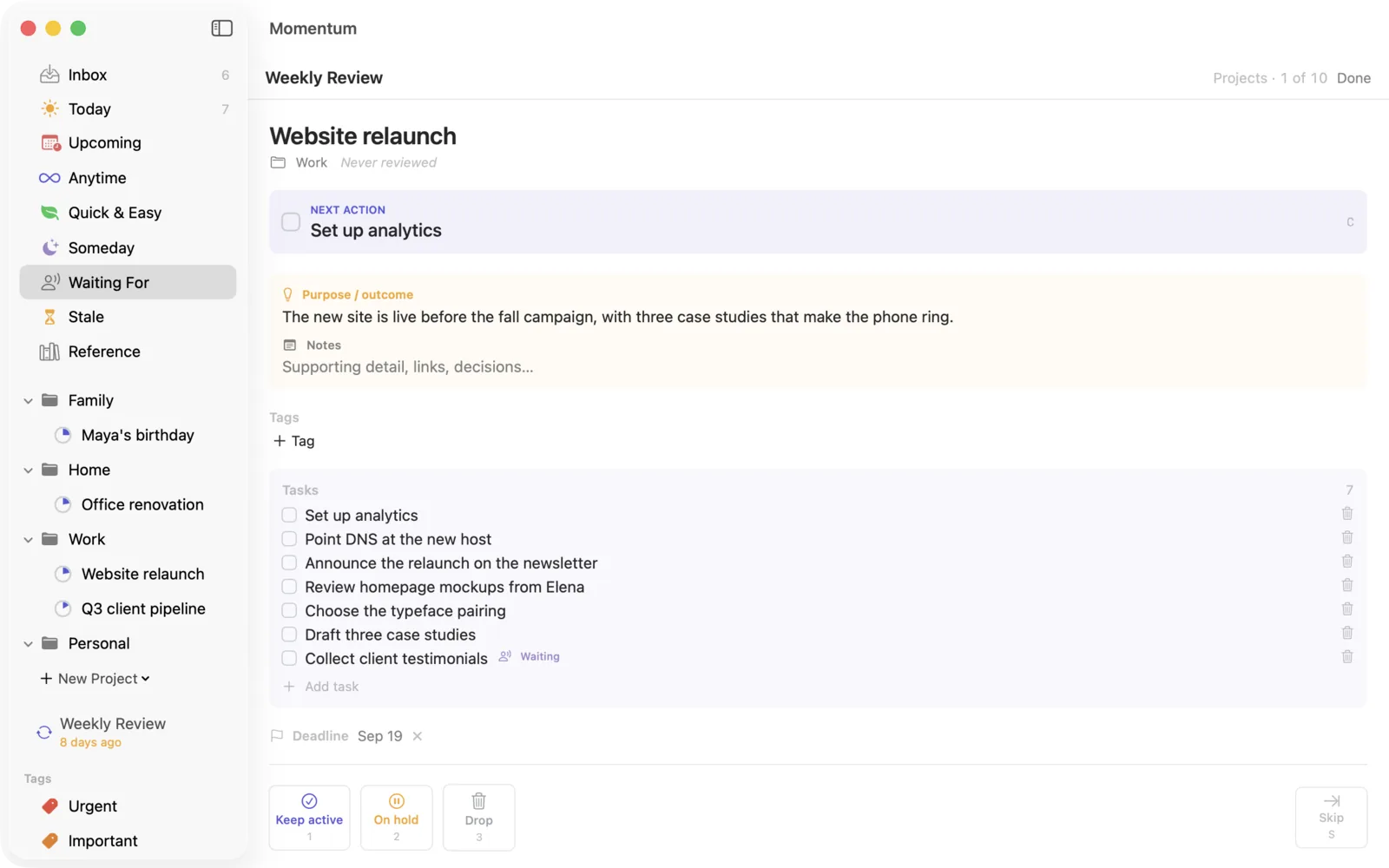
For each project you make one call:
Keep — it's alive. The wizard asks you to confirm there's a
concrete next action; a project without one is stalled by definition, whether
or not it feels that way.
Hold — deliberately paused. The project and its tasks move out
of your active lists until you release it. Paused-on-purpose is respectable;
stalled-by-accident is not.
Drop — it's over. Completed, cancelled, or admitted-to-be-never.
It moves to the Logbook.
The card is a cockpit, not a summary: the tasks sit under their headings, you can edit a title in place, move a task up or down, make it the next action, or move it to another heading — without rewriting or deleting anything.
5. Parked projects
A project on hold comes back to the review when its interval runs out — four weeks by default, changeable on the card. Reactivate, Keep parked, or Drop. Hold is a decision with a shelf life; this is the shelf.
6. Loose actions
Then the wizard sweeps your single tasks — including everything in Stale. Each one: still worth doing? Reword it, reschedule it, park it in Someday, or drop it. This is where the week's residue gets cleared.
7. Someday items
A pass through Someday. Most items stay parked — that's fine and takes one keystroke each. But every week you'll find one whose moment has come, and promoting it here is how good ideas re-enter the system instead of composting in it.
8. Be creative
One more field: anything new this week? Ideas, projects, hare-brained ones. The done screen then shows what the week produced — tasks completed, projects decided, parked, chased, captured.
Running it well
Same time every week. Friday afternoon closes the week; Sunday evening or Monday morning opens the next one. Pick one and block it on your calendar.
Expect 20–30 minutes. The first review after a messy stretch runs longer. That's the mess leaving the system, not the review being slow.
Don't do the work during the review. The review is for deciding, not doing. If you catch yourself knocking out tasks mid-review, capture the urge and keep moving.